Adult Coloring Book - Bloom
Koi AppsArt & Design
4.2152.00 Reviews
- Version
- 1.9
- Installs
- 50.00K
- Age Rating
- Everyone
Screenshots
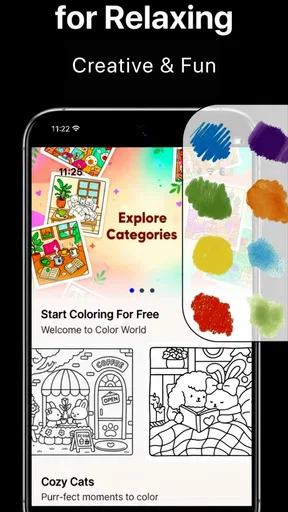
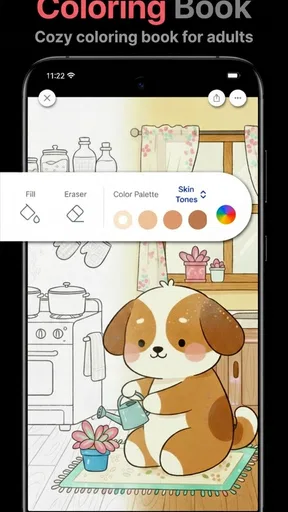
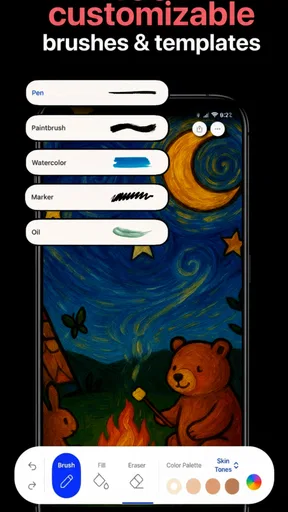
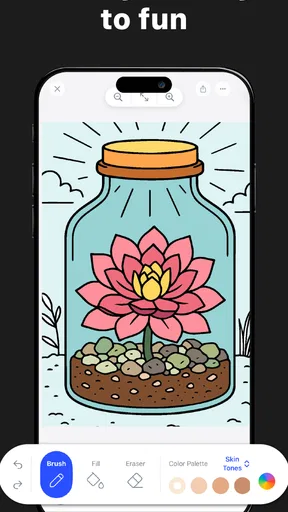
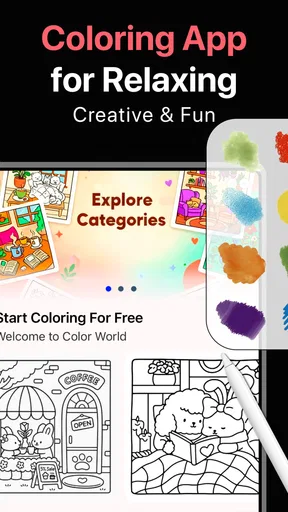
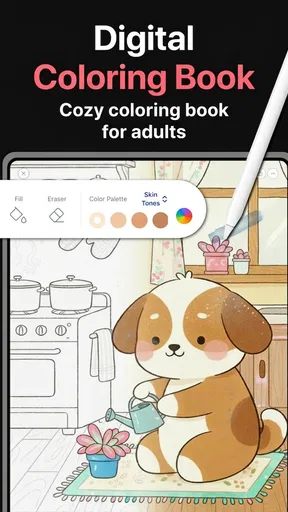
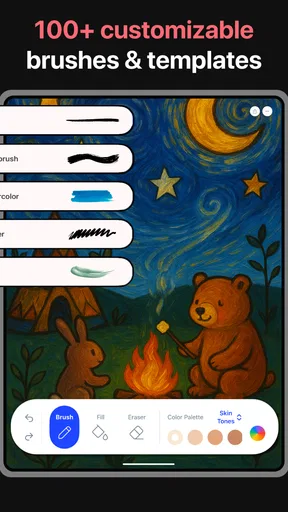
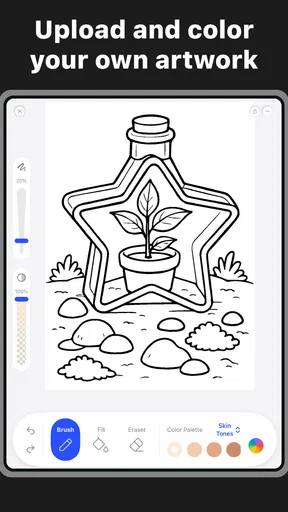
Our Review of Adult Coloring Book - Bloom
 Analysis by Appyee
Coloring apps often promise a quiet break, but many feel more like complicated drawing programs with a large library attached. Adult Coloring Book - Bloom takes a simpler route. Developed by Koi Apps, this free art and design app is built around one central capability: turning a coloring page into a low-pressure activity that I can pick up whenever I have a few spare minutes. That focus makes it easy to understand, although it also means the experience is less suitable for anyone looking for a full digital illustration studio.
I tested it with that distinction in mind. I was not expecting layers, professional brushes, or the control of a desktop art package. Instead, I looked at whether Bloom makes coloring feel comfortable on a phone, whether it works for short sessions, and whether the free starting point feels useful before optional purchases become relevant. My overall impression is that it succeeds best as a calming, guided coloring book rather than as a tool for creating artwork from scratch.
Why the coloring capability matters
The important feature here is not simply that the app contains pages to color. It is the way the coloring format reduces decisions. When I open a page, I am not faced with a blank canvas and a demand to invent something. The outlines provide the structure, while choosing colors supplies just enough creative control to keep the activity personal. That balance is especially helpful when I want to relax but do not have the energy to plan a drawing.
This is where Bloom feels different from a general sketching app. A sketching app gives me more freedom, but that freedom can become work. I have to select a brush, decide what to draw, manage the composition, and accept that the result may not resemble what I imagined. Bloom removes most of that pressure. The page is already there, so my attention can stay on color, rhythm, and small visual choices.
In practical terms, I found the experience closer to using a digital coloring book than to making a finished illustration. That is a strength for people who want a gentle routine. It is also an important limitation: if your main goal is to practice anatomy, perspective, lettering, or freehand technique, this app will not replace a serious drawing tool.
The app is listed as an adult coloring book, but the Everyone content rating makes it approachable for a broad audience. The adult label mainly describes the style of the activity rather than suggesting that the app is restricted or difficult. I would still choose pages according to the person using it, especially if a child is borrowing the device, but the basic concept is easy to understand.
A useful break from blank-page pressure
My favorite part of this capability is how quickly it creates a sense of progress. Filling a small area gives immediate visual feedback. Even when I only spend a short time on a page, the image looks more complete when I return to it. That matters because many creative apps reward long sessions, while a coloring app can make a few quiet minutes feel worthwhile.
There is also a subtle emotional advantage. A blank canvas asks me to perform. A coloring page asks me to respond. That difference makes Bloom a better fit for winding down after work, waiting for an appointment, or taking a screen break that still involves something creative. I would not describe it as a replacement for offline coloring, but it captures much of the same repetitive, absorbing quality without needing paper, pencils, or a clean table.
For me, the strongest use is not producing something impressive to share. It is creating a small pocket of concentration. The app works when I treat each page as an activity rather than a project.
How it feels during ordinary use
The first thing I noticed is that the experience is easy to approach. Bloom does not need a long explanation before I can begin coloring. That matters on a phone, where a complicated interface can make a relaxing activity feel strangely demanding. I could move from opening the app to making a color choice without having to learn a professional workflow.
The guided page format also changes how I use the color palette. Instead of spending time building a complete set of custom colors, I can make a quick decision and continue. That speed is useful when I am coloring in short bursts. On the other hand, people who enjoy mixing exact shades or constructing their own palette may find the experience more limited than a conventional art app.
A practical tip is to decide on a mood before choosing colors. I get better results when I begin with a simple idea such as warm, cool, soft, or high contrast, rather than repeatedly changing every color as I go. This keeps the session relaxed and prevents the page from becoming a series of indecisive adjustments. It is a small habit, but it makes the guided format feel more intentional.
Another useful approach is to stop before a page feels completely perfect. Because the app makes it easy to continue, I can fall into the trap of endlessly revisiting small areas. I found that saving a page at a satisfying point gives the activity a natural ending. That is especially helpful if I am using Bloom before bed or during a short break and do not want the session to expand into a longer screen habit.
What the free version means for a new user
Bloom is free to download, which makes it easy to try without committing money first. Optional in-app purchases range from forty-nine cents to eighty-nine dollars and ninety-nine cents per item. That is a wide range, so I would pay attention to the purchase screen rather than assuming every page or option is included at no cost. The free entry point is valuable, but the presence of optional purchases means the full catalog may not feel equally open to everyone.
My advice is to use the free experience long enough to answer one question: do you enjoy the actual coloring process, or are you mainly attracted to the idea of collecting pages? If the activity itself helps you relax, the app can be worthwhile even without buying anything. If you quickly feel blocked by unavailable content, a conventional coloring book or a one-time-purchase alternative may be a better match.
That distinction is important because the value of this type of app comes from repeated use. A large library is not automatically useful if I only open it once. I would rather have a modest selection that I return to than pay for a large collection that becomes visual clutter. Bloom works best when I choose a page and settle into it instead of browsing endlessly.
Device and version considerations
The current version is 1.9 and the app requires operating system version 12 or newer. In everyday terms, that means I would check the phone or tablet before recommending it to someone with an older device. This is not a concern for many recent devices, but it can matter when an older family phone is being used for casual apps.
The app has reached more than fifty thousand installs and holds a 4.2 average from around two thousand ratings, with 152 written reviews. Those figures suggest that Bloom has found a real audience, but I would not treat popularity as proof that it suits every coloring style. The people most likely to enjoy it are those who want a straightforward, guided activity rather than extensive artistic control.
I also appreciate that the app’s identity is clear. Koi Apps is presenting a focused coloring experience, not pretending that a simple page-based tool is a complete replacement for every kind of art software. That clarity makes the decision easier: install it for guided coloring, not for advanced digital painting.
The everyday situation where Bloom makes the most sense
The best scenario I found was a short evening reset. After finishing work, I often want something more active than watching videos but less demanding than learning a new skill. I can open Bloom, choose a page, and color for ten or fifteen minutes while listening to quiet music. The page gives my hands something to do, and the limited decisions help me move away from work-related thinking.
This also works during waiting time. A phone-based coloring book is easier to carry than a paper book with pencils, and there is no need to prepare a surface. If I am waiting for a train, sitting in a reception area, or taking a lunch break alone, the app gives me a self-contained activity that does not require social interaction. I can stop immediately when I need to move on.
One non-obvious benefit is that the unfinished page can become a visual marker for returning to the habit. When I reopen a partially colored image, I do not have to decide what to do from the beginning. That reduces the friction that often makes people abandon creative routines. I can continue with one area, change direction, or simply enjoy seeing the progress already made.
Bloom may also suit someone who feels intimidated by drawing apps. A friend who says, “I am not artistic,” may still enjoy selecting colors inside existing outlines. The app gives a safe way to experiment with combinations without requiring drawing ability. I would recommend it to that person before suggesting a blank-canvas application.
Where another option is better
I would not choose Bloom for a child who wants a learning-focused drawing tool, unless an adult has already checked the pages and the way the app is used. The Everyone rating makes the app broadly accessible, but accessibility is not the same as providing lessons, structured exercises, or age-specific instruction. A dedicated educational art app would be more appropriate for skill development.
I would also skip it if my goal were to create original illustrations, edit photographs, or draw with pressure-sensitive brushes. A professional art app offers more control over line quality, layers, opacity, and composition. Bloom’s guided coloring approach is intentionally narrower, so comparing it directly with a full illustration suite would be unfair to both products.
Offline paper coloring remains a better choice for anyone trying to reduce screen time completely. Paper also offers a different physical experience: the sound of pencils, the resistance of the page, and the ability to display the finished work without keeping it inside a phone. Bloom wins on convenience and portability, not on tactile realism.
There is a similar trade-off with subscription-style coloring services and large premium libraries. Those alternatives may offer more variety or more elaborate artwork, while Bloom may appeal to someone who wants a less crowded experience. The right choice depends on whether I value browsing options or beginning to color quickly.
Small habits that improve the experience
I found three habits particularly useful. First, I start with a limited color idea instead of trying to use everything available. A restricted palette makes the image feel more coherent and reduces the time spent making decisions. Second, I use short sessions deliberately. Stopping after one small section keeps the app associated with relaxation rather than obligation. Third, I revisit pages at different times of day. A bright, energetic combination may suit an afternoon, while softer choices feel more comfortable at night.
These habits reveal a trade-off that is easy to miss in a store description. A guided coloring app can reduce creative stress, but it can also make the activity so easy that I keep scrolling or coloring without noticing time passing. I get more from Bloom when I set a natural stopping point. The app is most calming when I remain in control of the session.
I also recommend judging a page by the process, not only by the final image. Some pages feel enjoyable because the sections are varied, while others may be more satisfying because they allow a steady repetitive rhythm. If I only choose images that look impressive when finished, I may overlook the pages that are actually more relaxing to color.
For users concerned about spending, the most sensible workflow is to explore the free material first, identify how often the app is genuinely used, and only then consider an optional purchase. The available purchase range is broad enough that casual users should avoid tapping through quickly. A coloring app should fit the budget of the person using it, not create pressure to complete a collection.
Who gets the most from this focused design
Bloom is a good fit for adults who want a simple creative pause, people who enjoy coloring but do not want to carry physical supplies, and beginners who feel more comfortable with guided images than blank pages. It can also work for anyone building a small evening routine around quiet activities. The free price makes trying it straightforward, provided the device meets the operating system requirement.
It is less convincing for experienced digital artists, users who need extensive customization, and anyone who wants a single app for drawing, painting, photo editing, and design. Those users will probably feel constrained by the coloring-book format. Someone who dislikes in-app purchase systems may also prefer a traditional book or a clearly paid alternative, depending on how much content they want to access.
The app’s Everyone rating and simple concept make it easy to share a device with family, but I would still treat it as a personal relaxation tool rather than a family art classroom. Its main strength is the quiet focus it gives one person at a time.
After using it, I see Adult Coloring Book - Bloom as a focused and approachable choice rather than an all-purpose art application. Its central capability—coloring prepared pages—has a real effect: it removes the pressure of starting from nothing and makes a short creative break feel achievable. That is more valuable than a long feature list for the right user.
My recommendation is simple. Try it if you want a portable coloring book, prefer guided creativity, and are comfortable evaluating optional purchases at your own pace. Skip it if you need freehand control, tactile paper, or a structured art-learning program. Bloom is at its best when the goal is not to become a better illustrator, but to give your attention somewhere calm to go.
Verdict
Strengths of Adult Coloring Book - Bloom
- Large variety of relaxing floral and nature-themed coloring pages.
- Simple touch controls make coloring accessible for beginners.
- Works well as a calming activity during short breaks.
- Color palettes can be customized for more creative freedom.
- Finished artwork is easy to save and share with others.
Limitations of Adult Coloring Book - Bloom
- Some pages and color tools may require in-app purchases.
- Small details can be difficult to fill accurately on phones.
- Ads may interrupt the experience in the free version.
- Limited offline access may affect use without an internet connection.
- The adult label may not suit users seeking more advanced artwork.
Other Releases by Koi Apps
View All
VideoAI: AI Video Generator
Art & Design4.3
Similar Picks in This Category
View All
Canva: AI Photo & Video Editor
Canva4.8

PENUP – Drawing-sharing SNS
Samsung Electronics Co., Ltd.4.5

Crafto
Kutumb App4.6

Sketchbook
Sketchbook4.1

ibis Paint X
ibis inc.4.5

Adobe Express: AI Photo, Video
Adobe4.6
Frequently Asked Questions
What is Adult Coloring Book - Bloom?
Adult Coloring Book - Bloom is a relaxing digital coloring app built around detailed illustrations, floral patterns, mandalas, animals, and other artistic designs. Users can choose a picture, select colors from the available palette, and fill areas by tapping on the screen. It is designed for casual creativity and stress relief rather than professional drawing or painting.
Is Adult Coloring Book - Bloom free to download and use?
The app can generally be downloaded for free, but some content or features may be limited unless you watch advertisements, purchase additional items, or subscribe to a premium option. Before confirming any payment, check the current in-app purchase details shown in the App Store or Google Play listing. Pricing, trial periods, and available designs may vary by device and region.
Does the app work without an internet connection?
Basic coloring may be available offline after the application and its required content have been installed, which is useful when traveling or using the app without mobile data. However, advertisements, cloud features, new picture downloads, purchases, and certain online functions may require an internet connection. Availability can also change after updates, so offline access should not be assumed for every design.
Is Adult Coloring Book - Bloom suitable for children?
Although coloring itself is simple and accessible, the app is marketed toward adults and may include advertising, optional purchases, or content that is not specifically designed for young children. Parents should review the app’s age rating, privacy information, and available artwork before allowing a child to use it. Enabling purchase restrictions is also recommended if the device is shared.
What features should I expect when coloring in the app?
The main experience focuses on selecting an illustration and filling its sections with different colors. Depending on the version, you may find tools such as color palettes, zoom controls, undo or redo options, finished-image saving, sharing, and daily or categorized artwork. The app is best suited to users who want an easy, guided coloring experience rather than advanced layers, brushes, or freehand editing.
